Automate document processing into Sage Intacct
Automate exporting data from your documents into Sage Intacct by integrating the Affinda Platform with your Sage Intacct account. Achieve straight-through processing by eliminating manual data entry for good.

Get data from your documents into Sage Intacct

Supplier invoices
Extract supplier details, line items and totals from invoices to create validated bills in Sage Intacct - with duplicate checking built in.
Purchase orders and invoices
Match invoice data to open purchase orders in Sage Intacct automatically - flagging discrepancies for review to prevent overpayments and strengthen audit trails.
Expense receipts and claims
Extract employee expenses, merchant details and amounts from receipts to create validated expense claims in Sage Intacct - accelerating reimbursements and strengthening compliance.
Contracts and agreements
Extract parties, dates and contract values from agreements to create or update contract records in Sage Intacct - improving visibility and strengthening compliance.
How to automate document processing into Sage Intacct
Affinda processes your documents in the background and sends data straight into Sage Intacct.Automatically send your documents to Affinda
Upload, email or integrate your documents as soon as you receive them.AI agents extract and validate key data fields
Affinda's AI agents extract and transform your data with superior accuracy, thanks to advanced contextual understanding and machine validation.See your data appear in Sage Intacct
Affinda sends your data straight into Sage Intacct, automatically populating all the extracted data fields.Extract any information from any document, fast
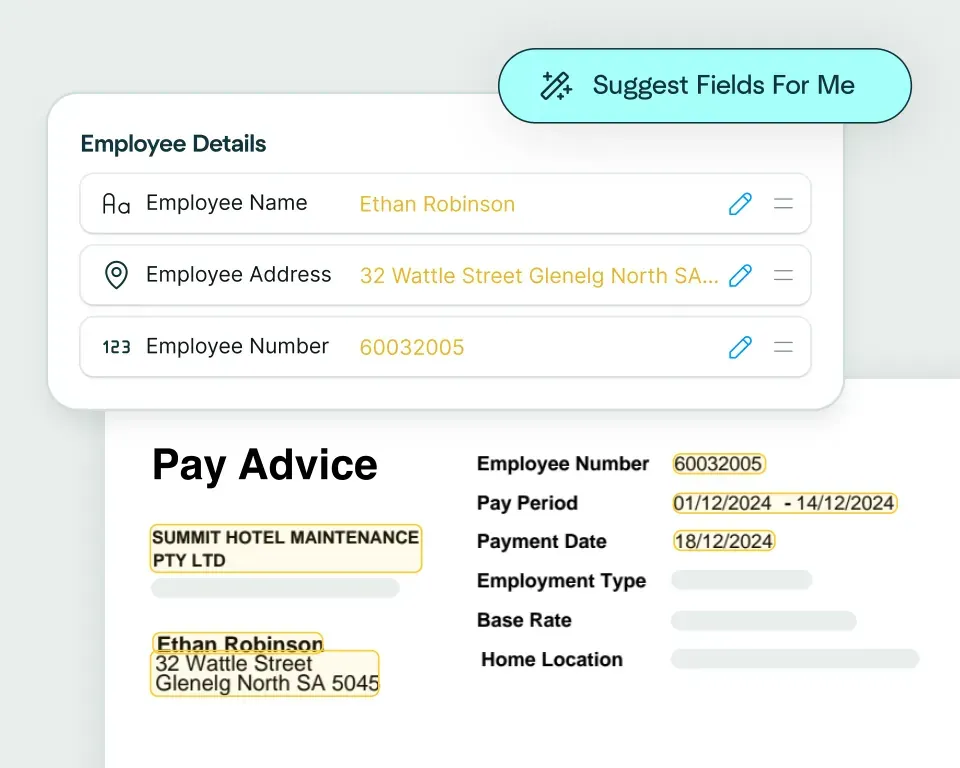
Create models in seconds
Upload a claims document and the Affinda Platform will predict the fields you need – like claimant details, policy number, incident date, totals and line items – so you can automate claims document processing in just a few clicks.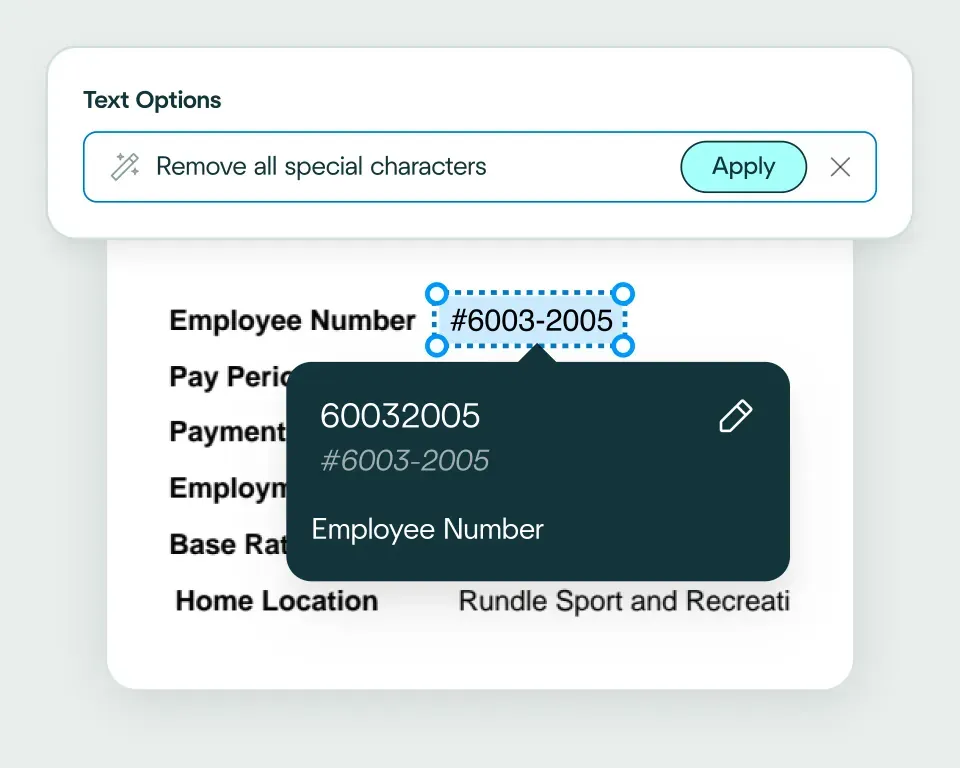
Validate and transform data
The platform checks extracted claims data against your business rules and transforms it into a format your claims management system expects. That way, it’s ready for workflows like coverage checks, reserving, routing and settlement.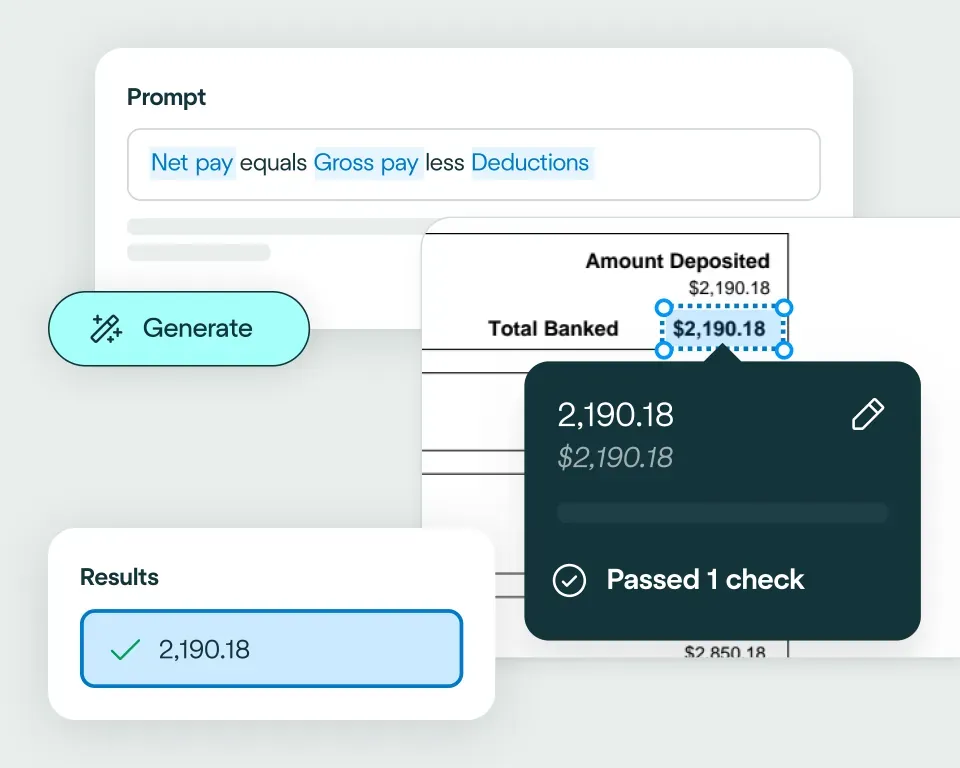
Apply your business logic
Use natural language to write validation rules that match your claims workflows, for example: flag missing fields; check policy numbers match correct formats; validate that document dates are within ranges; check financial consistency, such as line items summing correctly to totals.Pathway 1: Use the Agent
Create integrations fast, even if you’re not a developer. Choose from 2800+ business systems and describe how you want your claims document processing workflow to connect, using natural language. The Agent will generate the code to make it happen.Pathway 2: Write your own code
Easily connect Affinda Platform to your claims stack using our client libraries and APIs. Automatically generate type-safe Pydantic models or TypeScript interfaces tailored to your claims documents, so extracted fields map cleanly into your workflows.
No need to talk to sales. Get started now
Sign up for free
Sign up and configure your custom extraction model.Set up your integration
The Agent works like your own developer - describe how you want data exported, and it builds the integration for you.Start processing
Send your files to Affinda and watch as the data automatically populates into your downstream system.Automating their document processes with AI
Combine the best of artificial and human intelligence

Frequently asked questions
Does Affinda integrate with Sage Intacct?
Yes. Affinda's integration with Sage Intacct connects your document processing directly to your accounting system. It automatically extracts, validates and syncs data from invoices, purchase orders, expense claims, contracts and receipts straight into Sage Intacct. With Affinda, you can process financial documents faster, eliminate manual data entry errors and maintain complete control over your accounting workflows through a single, connected system.
How does the Affinda-Sage Intacct integration work?
Affinda's intelligent document processing reads any document from any source (email, upload or API) and instantly extracts structured data such as supplier details, invoice numbers, line items, dates and totals.
Once validated, this data is automatically pushed to Sage Intacct as bills, purchase orders, expense claims or contract records - ready for immediate use.
You can also configure custom validation rules, such as duplicate checking for invoices or routing exceptions for manual review.
What types of documents can Affinda process and send to Sage Intacct?
Affinda processes and imports data from any financial or business document into Sage Intacct, including:
- Supplier invoices and purchase orders
- Expense receipts and claims
- Contracts and agreements
- Timesheets and payment confirmations
Whether your documents are digital PDFs, scanned images or photos, Affinda handles them all - delivering 99%+ accuracy through advanced OCR and contextual AI that understands complex layouts, tables and multiple languages.
Do I need to manually upload files to Sage Intacct?
No. Affinda fully automates document ingestion and data import into Sage Intacct. You have three flexible options for getting documents to Affinda:
- Upload documents directly to your Affinda workspace
- Forward documents via email or configure auto-forwarding rules
- Connect via API or integrate with third-party cloud storage
Once received, Affinda automatically extracts and validates your data, then sends it straight to Sage Intacct - ready for immediate use in your accounting workflows.
Can I define my own validation and business rules?
Yes. Affinda lets you define custom validation and business logic before any data reaches Sage Intacct.
You can write rules in plain language to:
- Detect duplicate invoices before they're created as bills
- Verify that invoice amounts match open purchase order values
- Enforce expense policy limits and category requirements
- Route exceptions for manual review based on thresholds or missing data
These checks ensure your Sage Intacct data stays clean, compliant and ready for audit.
Can Affinda handle bulk invoice uploads for Sage Intacct?
Yes. Affinda handles bulk document processing with ease. Whether you're processing 20 invoices a month or 20,000 a week, Affinda's platform scales to meet your needs - supporting bulk uploads, automated ingestion and straight-through processing into Sage Intacct.
This makes it ideal for AP teams, accounting departments and finance operations managing high volumes of supplier invoices, expense claims and purchase orders across multiple entities or locations.
How fast can I get started with the Sage Intacct integration?
You can be up and running in under an hour. Affinda's flexible Sage Intacct integration allows you to:
- Connect securely via Sage Intacct Web Services API
- Map document fields to Sage Intacct entities (like bills, vendors or expense reports)
- Start importing data from documents immediately
For teams requiring deeper customization, Affinda also offers sandbox environments and full API access to build tailored workflows that fit your specific accounting processes.
Is my financial data secure when using Affinda with Sage Intacct?
Absolutely. Affinda follows security standards including ISO 27001:2022, SOC 2 and GDPR for security and compliance. Data is encrypted in transit and at rest, with strict role-based access controls and full audit logging. You can also select region-specific data storage to meet your organization's compliance and data residency requirements.
What are the main benefits of integrating Affinda with Sage Intacct?
By integrating Affinda with Sage Intacct, you can:
- Eliminate manual data entry and reduce errors across AP workflows
- Accelerate invoice processing, expense reimbursements and month-end close
- Prevent overpayments with automated purchase order matching and duplicate detection
- Strengthen compliance through built-in validation and audit trails
- Achieve straight-through processing from document receipt to Sage Intacct